
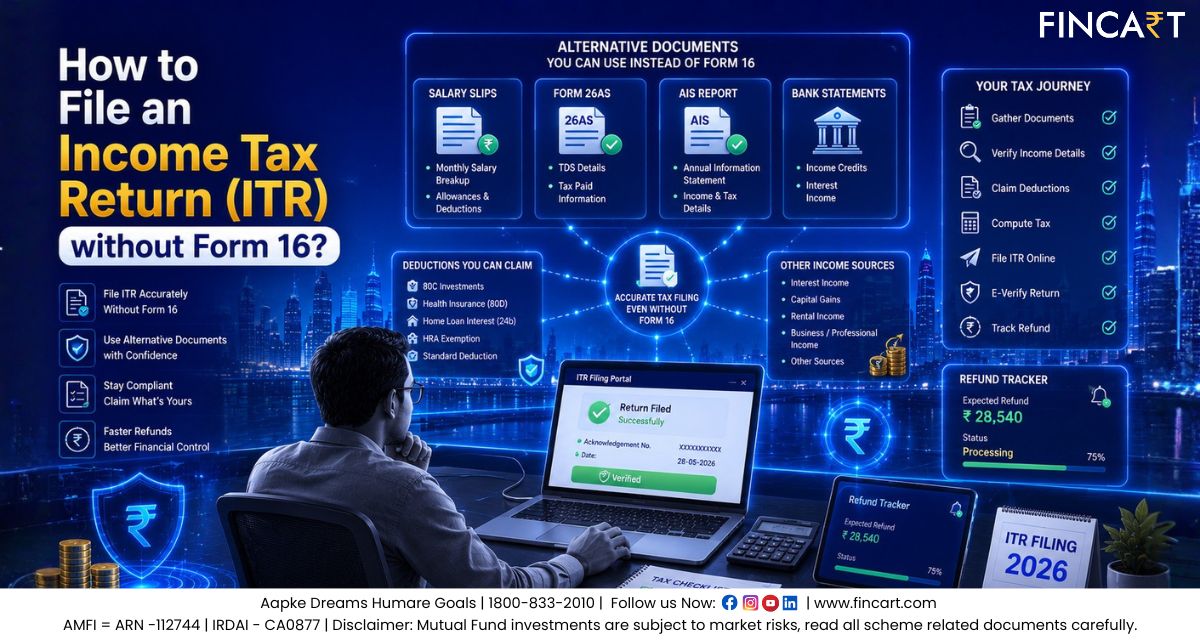
Every year during tax filing season, most salaried employees immediately reach for Form 16, the document that lays out their salary breakup and the tax already deducted by their employer. But what happens when that document does not arrive? What if you changed jobs mid-year, worked with a small employer, or are a freelancer with no employer at all?
The good news is, missing Form 16 doesn’t stop you from filing your return, that too completely and correctly. You just need to source the same information from a few other places. Understanding how to file ITR without Form 16 is more common a need than most people realise, and this guide walks you through the complete filing process, the documents required, and how to avoid common mistakes that can attract notices.
What Is Form 16 and Why You Might Not Have It
Form 16 is a certificate your employer issues after deducting tax from your salary and depositing it with the government. It has two parts:
- Part A confirms the amount of TDS deducted and deposited by your employer on your behalf
- Part B breaks down your full salary, allowances, and the deductions your employer considered
Employers are required to issue Form 16 on or before 15th June following the end of the financial year. However, you may not receive it if:
- Your income was below the taxable limit and your employer did not deduct any TDS
- Your employer is small or from the unorganised sector and did not issue the certificate
- You switched jobs during the year and one employer did not provide it
- You are a freelancer or self-employed individual with no employer
- You simply misplaced the document
Not having Form 16 does not mean you are exempt from filing. As long as your total income crosses the basic exemption limit, you are required to file a return, with or without Form 16.
Documents to Gather Before You Begin
The following documents together give you all the information that Form 16 would have contained:
- PAN card: your tax identity, required for the entire filing process
- Aadhaar card: needed for e-verification of your return
- Salary slips: all monthly slips from April to March of the financial year; collect them from all employers if you switched jobs
- Form 26AS: a tax credit statement available on the income tax portal that shows all TDS deducted against your PAN from every source
- Annual Information Statement (AIS): a detailed record of your financial activity including salary received, interest earned, dividends, and more
- Investment and deduction proofs: receipts for PPF contributions, ELSS investments, LIC premiums, home loan statements, HRA rent receipts, and so on
- Interest certificates: from your bank for savings accounts, fixed deposits, and recurring deposits
- Capital gains statements: from your broker or mutual fund platform if you sold any investments during the year
Once you have these ready, the filing process becomes very manageable.
How to File ITR Without Form 16: Step-by-Step Guide
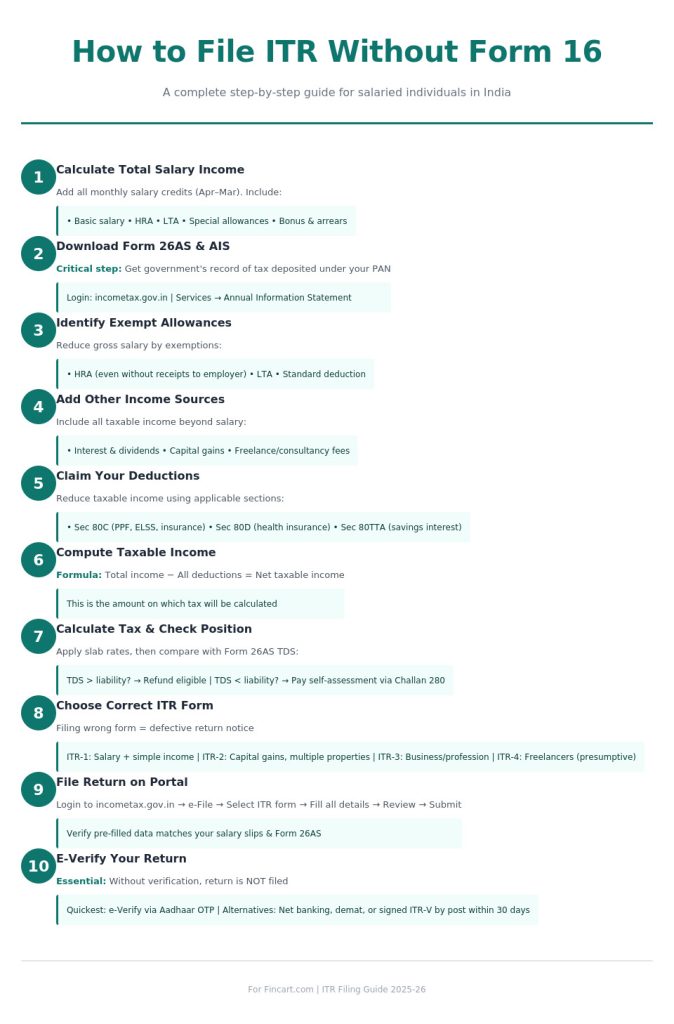
Step 1: Calculate Your Total Salary Income
Your salary slips are your primary source here. Add up every monthly salary credit from April to March. Pay attention to each component:
- Basic salary: fully taxable
- House Rent Allowance (HRA): partly or fully exempt if you live in rented accommodation
- Leave Travel Allowance (LTA): exempt if you actually travelled and have supporting proof
- Special allowance and other variable components: generally fully taxable
If you worked with more than one employer during the year, include salary slips from all of them. Also add any bonus, arrears, or incentive payments received during the year.
Step 2: Download Form 26AS and AIS
This is one of the most critical steps when learning how to file ITR without Form 16. Form 26AS shows the tax that has already been deposited with the government under your PAN. Think of it as the government’s record of what tax has been paid on your behalf.
To access it:
- Visit www.incometax.gov.in and log in with your PAN credentials
- Go to ‘e-File’ → ‘Income Tax Returns’ → ‘View Form 26AS’
- Download the statement for the relevant financial year
You can also download Form 26AS directly from the TRACES website at www.tdscpc.gov.in.
For AIS, log in to the income tax portal, go to the ‘Services’ tab, and download your Annual Information Statement. Cross-check the salary and TDS figures in both documents against your salary slips. If you spot a mismatch, contact your employer and ask them to correct it before you file.
Step 3: Identify Your Exempt Allowances
Not every rupee in your salary is taxable. Reduce your gross salary by the exemptions you qualify for:
- HRA exemption: based on the actual HRA you received, the rent you paid, and whether you live in a metro or non-metro city. Even if you did not submit rent receipts to your employer during the year, you can still claim this exemption directly while filing your return
- LTA exemption: covers actual domestic travel costs for you and your family, available twice in a four-year block
- Standard deduction: a flat deduction available to every salaried individual, applied automatically
One thing to expect if you are claiming HRA this way: if you did not submit rent receipts to your employer, they would have treated your full HRA as taxable and deducted TDS accordingly. Claiming the exemption now usually means you are owed a refund of that excess TDS rather than making a same-document adjustment. Since this often results in a refund claim, keep your rent receipts or rental agreement on hand. The tax department can ask you to substantiate the claim during assessment, even though you do not upload these documents at the time of filing.
After removing these exemptions, you arrive at your net taxable salary.
Step 4: Add Income From All Other Sources
Your salary is not the only income that gets taxed. You need to include:
- Savings account interest: add this under ‘Income from Other Sources’; a portion may be deductible under Section 80TTA
- Fixed deposit and recurring deposit interest: fully taxable; refer to your bank’s interest certificate
- Dividends: taxable in your hands beyond a certain threshold; check your AIS for the amounts
- Capital gains: from selling shares, mutual funds, or property; short-term and long-term gains are taxed at different rates, so segregate them
- Freelance or consultancy income: if you earned any fees outside your employment, include this under ‘Business and Profession’ or ‘Other Sources’ as applicable
Step 5: Claim Your Deductions
This step lowers your taxable income. Depending on the tax regime you choose, here are the common deductions available under the old tax regime:
- Section 80C: covers PPF, ELSS, EPF, NSC, life insurance premiums, home loan principal repayment, and children’s tuition fees
- Section 80D: health insurance premiums for yourself, your family, and your parents
- Section 80TTA: interest earned on savings bank accounts, up to the eligible limit
- Section 24(b): interest paid on a home loan for a self-occupied property
- Section 80G: donations made to eligible charitable organisations
- Section 80E: interest paid on an education loan
One important caveat many people miss is that if you are claiming a deduction for your Provident Fund contribution, claim only your own contribution, not your employer’s. Your employer’s contribution to PF is not eligible for deduction under Section 80C.
Under the new tax regime, most of the above deductions are not available. However, the standard deduction and your employer’s contribution to NPS under Section 80CCD(2) still apply.
Step 6: Compute Your Taxable Income
Once you have your total income from all sources and all eligible deductions identified, subtract the deductions from the total income. The resulting figure is your net taxable income, the amount on which your tax will be calculated.
Step 7: Calculate Tax Payable and Check Your Position
Apply the applicable slab rates to your net taxable income. You can find the current slab rates for both the old and new regimes on the income tax portal.
Now compare the tax you owe with the TDS already deducted (as shown in Form 26AS):
- If TDS is more than your tax liability, you are eligible for a refund
- If TDS is less than your tax liability, you need to pay the difference as self-assessment tax before filing
To pay self-assessment tax:
- Go to the income tax portal and select ‘e-Pay Tax’
- Choose Challan 280 and pay via net banking or UPI
- Note the Challan Identification Number (CIN) as you will need to enter this in your return
Step 8: Choose the Right ITR Form
Picking the correct form matters. Filing with the wrong one can result in a defective return notice:
- ITR-1 (Sahaj): for most salaried individuals with salary income, one house property, and simple other income
- ITR-2: if you have capital gains, more than one house property, or foreign income
- ITR-3: for individuals with income from a business or profession
- ITR-4 (Sugam): for freelancers and small business owners opting for presumptive taxation
Step 9: File Your Return on the Portal
Here is the actual filing process, the core of how to file ITR without Form 16:
- Log in to www.incometax.gov.in
- Go to ‘e-File’ → ‘Income Tax Returns’ → ‘File Income Tax Return’
- Select the correct Assessment Year
- Choose ‘Online’ as your filing mode
- Select your ITR form
- Fill in your personal details, income from all sources, deductions claimed, and tax payment details
- Review all pre-filled data on the portal and correct anything that does not match your salary slips or Form 26AS
- Submit the return after confirming the summary
Step 10: E-Verify Your Return
Submitting the return is not the final step. You must also verify it. Without verification, your return is treated as not filed. The simplest method is:
- After submitting, click on ‘e-Verify Return’
- Select ‘Aadhaar OTP’ and enter the OTP sent to your Aadhaar-linked mobile number
Other options include verification via net banking, a demat account, or by posting a signed physical ITR-V to CPC Bengaluru within 30 days of filing.
Common Mistakes to Avoid
When figuring out how to file ITR without Form 16, these errors come up most often:
- Skipping the Form 26AS and AIS reconciliation: if your declared income does not match what these documents show, your return may be flagged for scrutiny
- Missing income from other sources: savings account interest and dividends are the most commonly overlooked items
- Claiming deductions without supporting proof: only claim what you can back up with actual documents
- Claiming old regime exemptions under the new regime: HRA, LTA, and most Chapter VI-A deductions only apply if you have chosen the old regime
- Choosing the wrong ITR form: always verify which form applies to your income profile before starting
- Filing with unpaid tax dues: if self-assessment tax is pending and you file without paying it, the return will be treated as defective
- Claiming your employer’s PF contribution as a deduction: only your own contribution qualifies under Section 80C, and only under the old regime
When to Consider a Tax Consultant
For most salaried individuals, filing ITR independently is entirely doable. But some situations are complex enough to benefit from professional help. Consider reaching out to a tax consultant if:
- You have income from multiple employers and the TDS figures across Form 26AS are complicated
- You have capital gains from stocks, mutual funds, or property sales
- You have freelance income alongside salary and are unsure how to report it
- You received a notice from the income tax department
A good tax consultant can also help you compare your tax outgo under both the old and new regimes and choose the one that minimises your liability.
Quick Summary
Understanding how to file ITR without Form 16 essentially comes down to substituting one consolidated document with several individual ones, since you already have all the required information. Here is the process at a glance:
- Collect salary slips from all employers, Form 26AS, AIS, and investment proofs
- Determine whether you are filing under the old or new regime
- Compute gross salary and identify exempt allowances applicable to your chosen regime
- Add all other income: interest, dividends, capital gains, freelance
- Claim eligible deductions based on your regime
- Calculate net taxable income and compare against TDS already deducted
- Pay any remaining tax, then file on the income tax portal
- E-verify the return to complete the process
The due date for salaried individuals is typically 31st July of the assessment year. Filing on time avoids late fees under Section 234F and ensures any refund due to you is processed without delay. If your situation is simple, file it yourself. If it is not, tax consulting services are widely available and the peace of mind is worth it.
Frequently Asked Questions (FAQs)
1. Can I file ITR without Form 16 and salary slips?
Yes. If you don’t have salary slips either, you can use bank statements to total up salary credits, then cross-check the figure against Form 26AS and AIS on the income tax portal for accuracy.
2. How to file ITR without Form 16 for a private job?
Use salary slips to calculate gross income, download Form 26AS and AIS to verify TDS, claim eligible deductions, then file using ITR-1 on the income tax portal. The process is the same regardless of company size.
3. Can a freelancer file ITR without Form 16?
Yes. Freelancers don’t receive Form 16 since they have no employer. Use AIS, Form 26AS (for any TDS deducted by clients), and your own income records to file under ITR-3 or ITR-4.
4. What is the last date to file ITR without Form 16?
The due date is the same as regular ITR filing, typically 31st July of the assessment year for salaried individuals. Not having Form 16 does not extend this deadline.
5. Is there a penalty for filing ITR without Form 16?
No penalty applies for filing without Form 16 itself. Penalties under Section 234F apply only for late filing, not for the absence of Form 16.
6. How to check TDS without Form 16?
Download Form 26AS from the income tax portal or the TRACES website. It shows all TDS deposited against your PAN, even if your employer never issued a certificate.
7. Can I claim HRA exemption without Form 16?
Yes, under the old tax regime. Even without rent receipts submitted to your employer, you can calculate and claim HRA exemption directly while filing your return.
Disclaimer: This article is for general informational purposes only and does not constitute professional tax advice. Tax laws and provisions are subject to change, so please verify the latest details on the official income tax portal or consult a qualified tax consultant before filing.